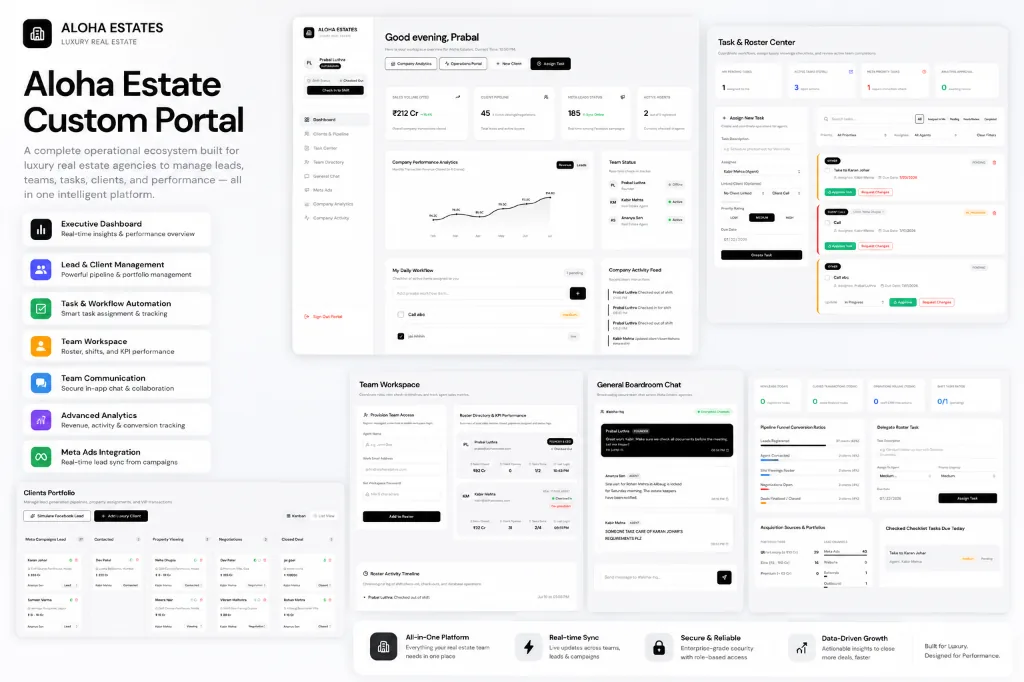
High-volume real estate agencies face a universal bottleneck: lead friction. When thousands of paid Meta leads, WhatsApp inquiries, and website forms flood in daily, managing team shifts across fragmented Google Sheets or generic off-the-shelf CRMs leads to lost revenue, delayed agent follow-ups, and zero visibility into active agent capacity.
In this technical guide, we dissect the architecture behind custom real estate operations portals like Aloha Estate Custom Portal—demonstrating how to engineer real-time lead pipelines, instant Meta Webhook syncing, automated shift rosters, and executive deal velocity analytics in one unified workspace.
1. The Fragmentation Problem in Modern Real Estate Operations
Most real estate firms rely on a chaotic stack of disconnected tools: Meta Lead Ads for paid acquisition, WhatsApp web for client conversations, Excel sheets for inventory tracking, and phone calls for agent check-ins. This fragmented workflow creates critical operational failures:
- Lead Response Latency: Leads imported via CSV export take hours to reach sales agents. In real estate, contacting a prospect within 5 minutes increases conversion rates by 391%.
- Duplicate Outreach: Multiple agents message the same client without knowing existing conversation history.
- Unchecked Shift Accountability: Managers cannot verify which agents are currently checked in, active on duty, or available to take high-intent property inquiries.
- Invisible Pipeline Velocity: Executive leadership lacks real-time insight into year-to-date sales volume, active lead stages, or Meta ad spend ROI.
“Replacing fragmented spreadsheets with a custom real estate portal turns lead generation into an instant, automated assembly line where agents receive enriched lead data seconds after a user clicks submit on Meta.”
2. System Architecture: Event-Driven Real-Time Engine
To support real-time collaboration across dozens of agents simultaneously, the portal uses a reactive, event-driven architecture combining WebSockets for state synchronization, serverless edge functions for webhook ingestion, and relational PostgreSQL databases (Supabase) for ACID transactional safety.
// Architecture Pipeline Overview:
// [ Meta Lead Ads Webhook ] ──> [ Edge Function (Validation & Dedup) ]
//                                       │
//                                       ▼
// [ Postgres DB (Row-Level Security) ] ──> [ WebSocket Broadcast Engine ]
//                                       │
//                                       ▼
// [ Unified Client Pipeline (Kanban UI) & Agent Queue ]
3. Instant Meta Webhook Syncing & Automated Lead Allocation
Instead of relying on third-party connectors with polling delays, the platform implements direct HTTP Webhooks listening to Meta’s Lead Ads API. The moment a prospect completes a instant lead form on Facebook or Instagram, Meta sends a payload to our secure edge endpoint.
Below is a simplified node snippet showing how lead payloads are validated, enriched, and auto-assigned to active checked-in agents:
// Meta Webhook Processing & Auto-Assignment Endpoint
export async function handleMetaWebhook(req, res) {
    const { leadgen_id, page_id, form_id } = req.body.entry[0].changes[0].value;

    // 1. Fetch encrypted Lead details from Graph API
    const leadData = await fetchMetaLeadDetails(leadgen_id);

    // 2. Deduplicate lead against active CRM records
    const existing = await db.from('leads').select('id').eq('phone', leadData.phone).single();
    if (existing) {
        return updateExistingLeadActivity(existing.id, leadData);
    }

    // 3. Query currently checked-in agents with lowest active load
    const activeAgent = await db.rpc('get_next_available_agent');

    // 4. Create Lead & emit instant WebSocket push notification
    const { data: newLead } = await db.from('leads').insert({
        name: leadData.full_name,
        phone: leadData.phone,
        email: leadData.email,
        campaign_name: leadData.campaign_name,
        assigned_agent_id: activeAgent.id,
        stage: 'NEW_LEAD'
    }).select().single();

    broadcastRealtimeEvent('NEW_LEAD_ASSIGNED', { lead: newLead, agentId: activeAgent.id });
    res.status(200).send('EVENT_RECEIVED');
}
4. Real-Time Kanban Pipeline & Roster Overwatch
The visual pipeline allows management and field agents to drag-and-drop client cards across custom stages: New Lead, Contacted, Site Visit Scheduled, Negotiation, and Deal Closed.
Key Features of the Unified Roster Console:
- Agent Check-In / Check-Out: Geofenced or manual toggle letting managers view live active duty status.
- Task Ratings & Manager Approvals: Tasks submitted by field agents (e.g. site visit notes, pricing proposals) require supervisor review before advancing the pipeline.
- Direct Boardroom Workspace Chat: Integrated chat channels eliminate internal WhatsApp clutter, keeping all communications tied directly to specific client profiles.
5. Executive Analytics & Business Intelligence
For executive leadership (CEOs and Sales Directors), the executive dashboard consolidates critical high-level metrics in real time:
- Year-to-Date Sales Volume: Instant tracking of closed property deals (e.g., ₹212 Cr+ total sales).
- Meta Campaign ROI: Cost per qualified lead (CPL) broken down by specific Facebook and Instagram ad sets.
- Agent Conversion Leaderboard: Tracking response times, call volume, site visit ratios, and closed transactions per agent.
Conclusion: Building Custom vs. Off-the-Shelf CRMs
Generic CRMs charge hefty per-seat subscription fees while forcing real estate agencies to compromise on their unique operational workflows. A custom-built operations portal provides complete ownership, zero recurring per-user fees, and absolute alignment with your team’s daily execution.
Transform Your Real Estate Operations
Ready to replace messy spreadsheets with a custom real estate portal built for high speed and maximum deal velocity?
Book a Custom Portal Consultation