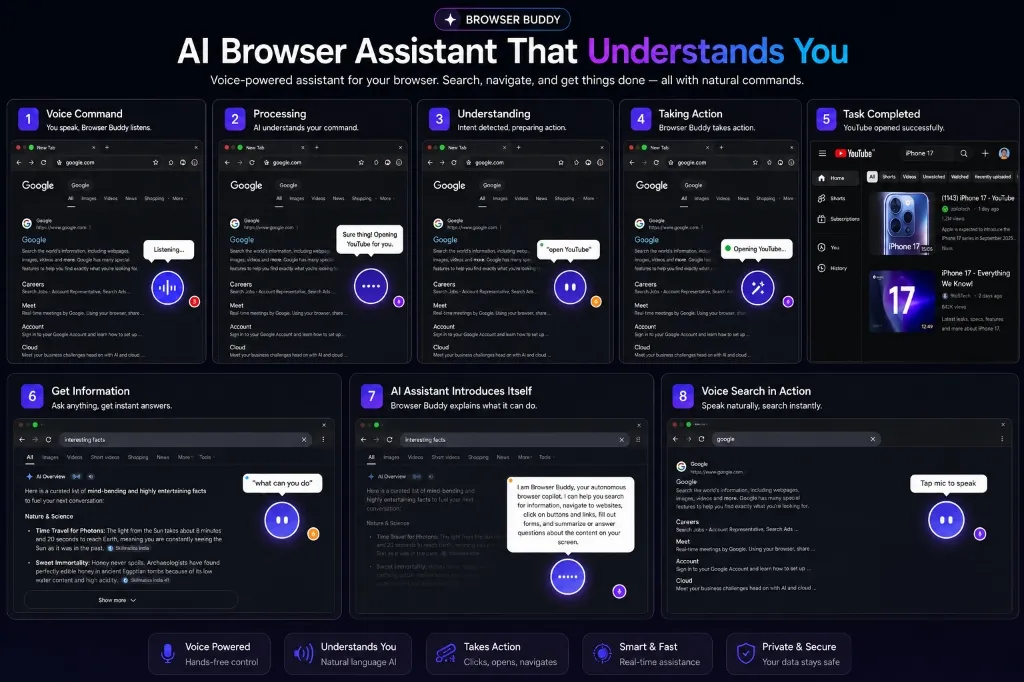
What if your browser could read, speak, navigate, and execute complex online tasks for you? Instead of spending hours manually copying research data, filling out repetitive client forms, or tracking prices across multiple tabs, AI browser agents turn your web browser into an autonomous employee.
In this technical engineering breakdown, we detail how we built Browser Buddy—a voice-enabled Chrome extension powered by the Google Gemini API that understands natural spoken intent, constructs lightweight DOM accessibility trees, and executes deterministic multi-step browser actions safely.
1. Beyond Brittle Automation: Why Selenium and Puppeteer Fail
Traditional browser automation scripts (like Selenium, Playwright, or Puppeteer) rely on rigid XPath expressions or CSS selectors (e.g. #btn-submit-v2). The moment a web designer changes a container class or layout structure, the script breaks.
AI browser employees solve this by operating at the semantic level. Instead of hardcoding selectors, the agent analyzes the DOM’s accessibility tree and interactive elements in real-time, matching natural language requests like “Book a table for two at 8 PM on Friday” or “Extract all active pricing plans from this SaaS page” to actual page components.
“An AI agent doesn’t just click buttons—it understands intent, evaluates DOM states, handles popups gracefully, and self-heals when element positions change.”
2. System Architecture: Voice to Execution Pipeline
Browser Buddy operates through a multi-tier extension pipeline split across the Content Script (DOM inspector), Background Service Worker (Gemini API Orchestrator), and Side Panel UI (Voice & Log Terminal).
// Browser Buddy Agent Execution Loop:
// 1. User Voice Command ──> [ Web Speech Recognition API ]
//                                   │
// 2. DOM Inspector ────────> [ Compact Accessibility Tree Extractor ]
//                                   │
// 3. Orchestrator ─────────> [ Google Gemini API Function Calling ]
//                                   │
// 4. Action Execution ─────> [ CDP / Extension Script Injection ]
//                                   │
// 5. Verification ─────────> [ Screen State Evaluation & Feedback ]
3. Extracting Token-Efficient DOM Accessibility Trees
Sending full HTML DOM trees (often exceeding 50,000 lines of code) to an LLM wastes context tokens and degrades response speed. We compress the raw DOM into a minimal JSON Accessibility Tree containing only interactable nodes:
// Compact DOM Tree Parser Example
function extractInteractiveDOMTree() {
    const selector = 'button, a, input, select, textarea, [role="button"]';
    const elements = document.querySelectorAll(selector);

    return Array.from(elements).map((el, index) => ({
        id: index,
        tag: el.tagName.toLowerCase(),
        text: el.innerText || el.placeholder || el.alt || '',
        role: el.getAttribute('role') || el.type || '',
        bounding: el.getBoundingClientRect(),
        isVisible: isElementInViewport(el)
    })).filter(node => node.isVisible && node.text.trim().length > 0);
}
4. Structured Function Calling with Google Gemini API
We provide the Gemini API with a suite of deterministic browser execution tools: click_element(id), fill_input(id, text), scroll_page(direction), switch_tab(index), and summarize_page().
Here is how tool declarations are structured in JavaScript for Gemini API function calling:
const browserTools = [
    {
        name: "click_element",
        description: "Click an interactive button or link on the active webpage by element ID",
        parameters: {
            type: "OBJECT",
            properties: {
                element_id: { type: "NUMBER", description: "The numeric ID of the DOM element" },
                reason: { type: "STRING", description: "Why this action is being taken" }
            },
            required: ["element_id"]
        }
    },
    {
        name: "fill_input",
        description: "Type text into a text input or textarea field",
        parameters: {
            type: "OBJECT",
            properties: {
                element_id: { type: "NUMBER", description: "The numeric ID of the input element" },
                text_value: { type: "STRING", description: "The text to insert" }
            },
            required: ["element_id", "text_value"]
        }
    }
];
5. Guardrails, Security & Safety Controls
Autonomous web agents must execute safely without compromising sensitive user data:
- Sensitive Field Intercepts: Password fields, credit card inputs, and 2FA prompts bypass automated entry and require explicit user approval.
- Human-in-the-Loop Confirmation: Destructive actions (like submitting payment forms or deleting data) present a confirmation dialog before firing.
- Sandboxed Context Execution: Chrome Extension APIs enforce strict origin isolation to prevent malicious cross-site scripting (XSS).
The Future of Agentic Browsing
As multimodal LLMs continue to evolve in speed and visual reasoning, AI browser employees will transform how businesses handle back-office data entry, market research, and multi-app workflows. Instead of writing custom API integrations for every legacy web platform, an AI agent simply logs in and completes the work like a human employee.
Supercharge Your Web Workflows with Custom AI Tools
Want to build custom AI agents, voice-controlled extensions, or automated web scraping pipelines for your team?
Discuss Your AI Project With Curious Kaizer